The way students are assessed is changing. It is no longer enough to control what happens inside the classroom: the digital transformation of education requires integrating tools that ensure academic integrity, facilitate review, and provide verifiable evidence efficiently.
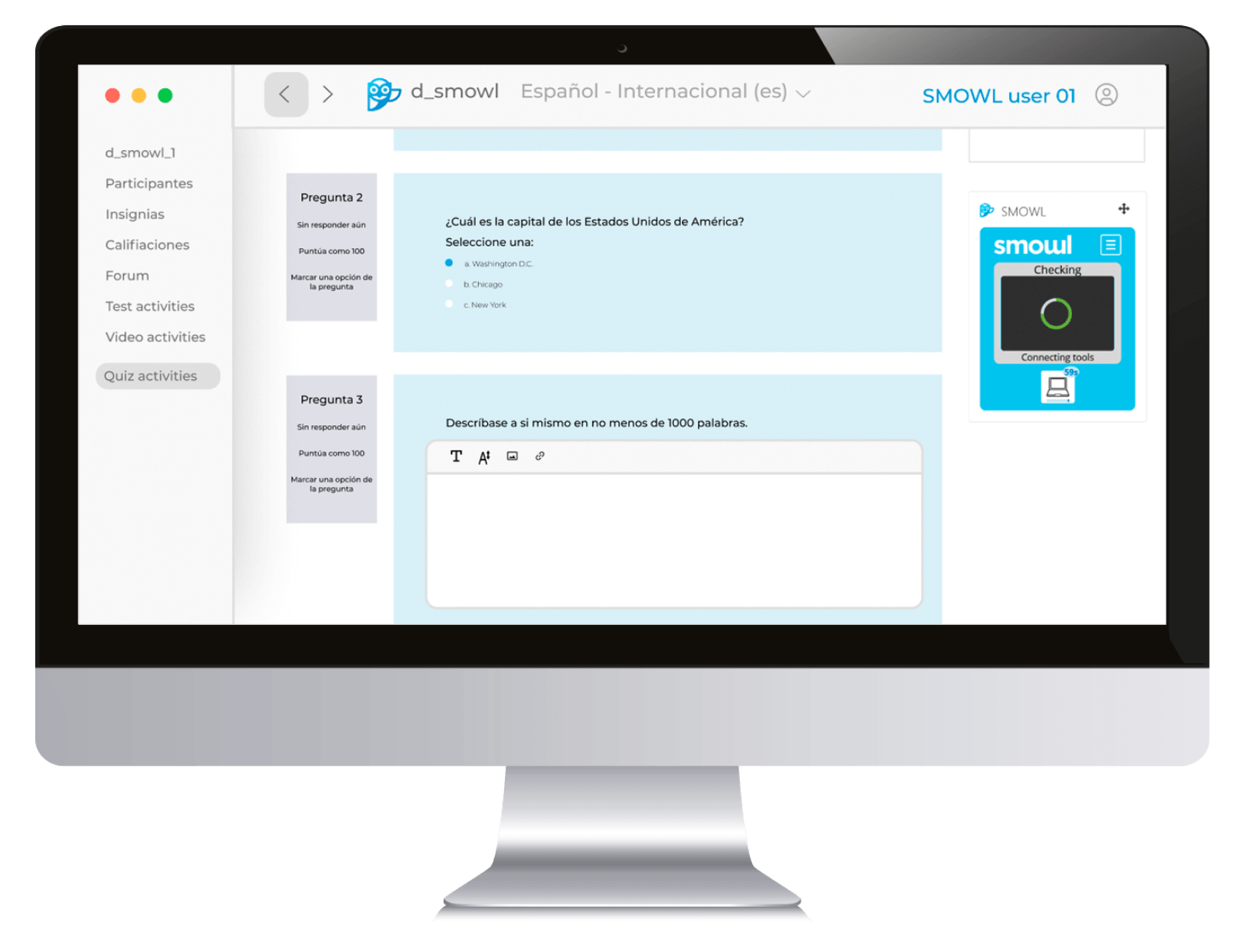
In this context, SMOWL CLASS emerges as a proctoring solution designed specifically for in-person exams taken on computers.
SMOWL combines traditional invigilation with reliable digital records, allowing you to control student activity in real time and generate reports that support academic decision-making.
This comprehensive guide explains how to plan, implement, and optimize SMOWL step by step, offering advice for instructors, coordinators, IT teams, and students.
What SMOWL CLASS is and why to use it
SMOWL CLASS is a proctoring plan designed for on-site environments where students take exams on computers in a controlled classroom.
Its goal is to ensure the integrity of the assessment through two complementary approaches: Computer Monitoring (CM) and/or Browser Lock.
With CM, device activity is recorded: screen, browsing, open applications, audio, and webcam (the latter is typically unnecessary in an in-person setting).
This mode is flexible and allows the use of authorized software, making it ideal for practical exams, projects, or portfolios that require detailed post-exam review.
Browser Lock, meanwhile, focuses on controlling the browser: it prevents opening new tabs, accessing other sites, copying content, or using suspicious key combinations. It is installed via the SMOWL EXTENSION and is especially useful for multiple-choice tests, certifications, or high-stakes exams.
The main advantage of SMOWL for on-site use is that it combines physical invigilation with traceable digital evidence. This means that, in addition to in-room supervision, multimedia records, activity timelines, and alerts for suspicious behavior are generated.
Its integration with LMS platforms (Moodle, Canvas, Blackboard, Open LMS) and its compliance focus also strengthen institutional trust and facilitate exam auditing.

Pre-exam preparation: infrastructure and coordination
A secure exam depends on careful planning. Coordination among the institution, instructors, the IT team, and students is essential to minimize incidents.
Technical infrastructure
To begin, the classroom must have computers compatible with Windows or macOS and an up-to-date browser (Chrome or Edge are recommended for Browser Lock).
The network must be stable and able to support all devices simultaneously, since any outage can affect evidence transmission and the student experience.
Organization and logistics
Ensure all SMOWL CLASS licenses are active and assigned to the appropriate users, and that the exam is configured as proctored within the LMS. Students should be informed in advance which modality will be used, what resources are allowed, and which behaviors are prohibited.
Finally, having technical support available (or at least someone in direct contact with support) in the room reduces exam-day tension and enables quick problem resolution.
Monitoring Modalities: Computer Monitoring and Browser Lock
Choosing a monitoring modality depends on the type of exam and the required security level.
Computer Monitoring provided by SMOWL CM continuously monitors device activity, capturing evidence through open applications, connected peripherals, and window changes.
It is ideal for practical or development-oriented tests where specific software is allowed and detailed post-exam review is needed.
Its biggest advantage is flexibility: students can work with their usual tools without strict lockdowns, while the academic team receives comprehensive logs to evaluate any incident.
Browser Lock, on the other hand, focuses on creating a secure environment within the browser. Once activated, it prevents students from opening new tabs or windows, accessing other sites, copying content, using suspicious keystrokes (such as Ctrl+C or Alt+Tab), force-closing the browser, or interacting with external extensions.
This mode is especially useful for multiple-choice tests, certifications, or short assessments where every student action must be controlled and the experience must be smooth. It is installed via the SMOWL EXTENSION and works without additional software, integrating easily with most LMSs and Chromium-based browsers.
In practice, many institutions combine both modalities: Computer Monitoring for development-oriented assessments and Browser Lock for objective multiple-choice tests.
This way, you achieve a balance between flexibility and security, ensuring the integrity of all exams.
Exam setup in the LMS
Proper LMS configuration is key to a successful exam.
First, enable SMOWL proctoring on the activity and select the appropriate modality. Then define which elements will be recorded (screen, webcam, audio, if applicable) and set alert sensitivity according to institutional policy.
In Browser Lock, explicitly declare allowed sites and resources, while in CM you can document exceptions for authorized software such as development environments or statistical tools.
It is also important to define the exam time window or retake limits. Finally, including an initial technical check question helps ensure all systems work properly before starting the assessment.
Student registration and installation
Student registration and preparation are crucial to avoid issues on exam day. First, they should access the course in the LMS and the SMOWL registration link, accept the terms, and run a pilot test confirming that camera, microphone, and browser permissions are properly enabled.
For Computer Monitoring, students must download and install SMOWL CM on the designated computer and verify that the activity indicator is active. For Browser Lock, they install the SMOWL EXTENSION in Chrome or Edge, ensuring that permissions are granted and the icon is visible.
Before the exam, each student should have only one monitor connected, a stable connection, and close any unnecessary applications.

Classroom and network preparation
Classroom logistics are key to avoiding problems during the assessment. Workstations should be arranged to minimize unauthorized collaboration and include clear signage about rules and support channels.
Check that all peripherals are functioning properly and that sufficient power is available for all devices.
The network should be sized according to the number of workstations, prioritizing critical traffic for evidence transmission and blocking mass updates or unnecessary streaming.
It is also advisable to run a load test during the exam time window to anticipate potential issues. Having on-site support staff and documented escalation protocols allows for fast resolution of any contingencies.
Exam Day: step-by-step operation
On exam day, student identification and verification of enrollment in the LMS are the first steps. It is advisable to remind students of the exam rules and ensure that each individual environment is ready: a clear desk and only one monitor.
Student identification will be performed the same way as in any traditional in-person exam: each student must show their ID upon entering the classroom.
This procedure is complemented by SMOWL’s digital supervision while preserving the familiarity and security of traditional physical checks, avoiding confusion and reinforcing trust among all participants.
At the start of the exam, students should open the test in the LMS, grant the required permissions, and confirm that SMOWL is active.
During the test, CM continuously monitors the device, while Browser Lock blocks any suspicious action within the browser. On-site invigilation remains complementary, recording any incidents that occur beyond the digital scope.
At the end, make sure answers are submitted and all records are properly synchronized. In the event of contingencies such as connection loss, camera or microphone failures, apply the previously defined recovery protocols.
Any disciplinary situation is documented with digital evidence and in-room staff observations.
Report review and grading
SMOWL generates detailed reports with an event timeline, screenshots, and integrity metrics.
Review should start by filtering the most relevant incidents and examining the associated multimedia evidence.
It is advisable to triangulate this information with on-site invigilation notes and LMS logs to make well-founded decisions on potential infractions.
Establishing severity criteria and using an incident rubric ensures consistency among different evaluators and exam boards. If a student is notified, provide a review or appeals channel according to institutional regulations.
Privacy, ethics, and compliance
SMOWL monitoring is carried out under principles of transparency, proportionality, and data security, complying with GDPR and best practices in information protection.
It is essential to obtain informed consent from the student, limit monitoring to the necessary modules, and ensure clear data retention and access policies. Consider accommodations for students with special needs, ensuring an equitable and secure experience.
Do you want to stay on top of the latest trends in eLearning, EdTech, and Human Resources?
Fill out the form to receive our weekly newsletter with industry insights from our experts.
Training and Communication for Students
Preparing students reduces anxiety and minimizes operational errors. Provide a quick guide with registration steps, installation, and exam rules, complemented by an explainer video on the interface and required permissions.
Pilot tests are essential, especially in large cohorts, to familiarize students with the monitoring modality and exam flow.
Best practices by role
Every actor involved in an in-person exam proctored with SMOWL has specific responsibilities to ensure a secure, efficient, and fair assessment.
From instructors and coordinators to IT teams and students, everyone plays a key role in the success of the process.
Below are recommended best practices for each role to optimize the monitoring experience and maintain academic integrity at all times.
- Instructors: design exams that minimize collusion, adjust monitoring to pedagogical objectives, and validate reports systematically.
- IT/support: keep systems up to date, monitor the network, and resolve technical issues quickly.
- Academic coordination: establish clear incident policies, schedule pilot tests, and periodically review monitoring parameters.
- Students: get familiar with the platform, arrive early, and maintain consistent posture and framing during the exam.
Specific scenarios
The choice of monitoring modality and exam planning may vary depending on the type of assessment and classroom context:
Specialized software
When exams require specific tools such as programming environments, statistical software, or design applications, SMOWL CM is ideal.
This modality allows students to freely use authorized programs while continuously recording all device activity, including window changes, browsing, and app usage, ensuring sufficient evidence for later review without interfering with their work.
Admissions or certification exams
In assessments where security is critical and the risk of fraud must be minimized, Browser Lock provides a fully controlled environment within the browser.
It blocks opening new tabs, accessing external sites, copying or pasting content, and using suspicious shortcuts, ensuring each student completes the test individually and without distractions.
This modality is especially useful for large-scale multiple-choice exams or official certifications.
Clinical or practicum assessments
In contexts requiring real-time performance observation or simulated interaction, SMOWL CM can be complemented with image and audio capture, as permitted by the institution’s privacy policy.
This allows evaluating not only answers but also behavior, communication, and the development of practical skills.
Multiple classrooms or large cohorts
When an exam is held simultaneously in several rooms, it is advisable to stagger start times to avoid overloading the network and systems.
Assigning area leads or room supervisors enables quick and efficient incident management, coordinating the resolution of technical issues, supervising rule compliance, and ensuring a uniform experience for all students.

Success indicators and continuous improvement
The most relevant indicators include the incident rate, percentage of students without technical problems, result consistency, and item validity.
Tracking these indicators allows you to adjust monitoring sensitivity, refine allowed lists, and retrain students and staff, closing a cycle of continuous improvement.
Common risks and mitigation
Although SMOWL provides a secure and traceable framework for exam supervision, there are operational risks worth anticipating:
- Network outages or connectivity issues: An unstable connection can interrupt evidence transmission and affect the student experience. Plan redundant network paths, test connectivity under loads similar to exam conditions, and establish a recovery protocol to resume the session without impacting the assessment.
- Excessive restrictions in Browser Lock: This feature prevents the student from leaving the exam window and may even result in their expulsion. To avoid any unexpected events, the expulsion criteria should be reviewed before the exam, and simulations with real users should be conducted.
- Student resistance or confusion: Some students may feel uncomfortable or unsure about digital supervision. Mitigate this through transparency and clear communication, explaining the purpose of proctoring, how data is handled, and offering practice runs to get familiar with the system.
These measures reduce risks and ensure that generated alerts are meaningful, facilitating fair and efficient review.
4-Week Implementation Plan
Proper time planning ensures the exam runs smoothly. It is recommended to organize the SMOWL rollout in four phases:
- Week 1 – Preparation: Review the integration between the LMS and SMOWL, activate necessary licenses, and inventory classroom equipment and peripherals. Configure the exam in the LMS, defining monitoring modality, timing, and allowed resources. This phase lays the foundation for a controlled, stable exam.
- Week 2 – Testing: Conduct a technical dry run with a small group of students, verifying installation of SMOWL CM or the SMOWL EXTENSION and the proper functioning of cameras, microphones, and the network. Adjust allowed resource lists, check alert sensitivity, and simulate the network load expected on exam day.
- Week 3 – Training: Share a concise guide, checklist, explainer video, and FAQs with students. Run a pilot test with the entire cohort to get familiar with the technical and operational flow. At the same time, invigilation and support staff receive training on protocols, roles, and incident management.
- Week 4 – Execution: Run the exam as planned, with digital and on-site supervision. Log all technical or behavioral incidents, and afterward review SMOWL reports to make evidence-based decisions on any alerts detected.
This phased approach anticipates problems, trains staff, and ensures a consistent experience for all students.
Master Checklist
To ensure a smooth, controlled exam, use this checklist organized in three phases:
- Before the exam: Verify that LMS proctoring is enabled, the chosen modality (CM or Browser Lock) is properly configured, workstations have functional cameras and microphones, and the classroom network is stable with no scheduled maintenance. Make sure students have completed the pilot test and received the user guide.
- During the exam: Confirm SMOWL indicators are active on all devices, browser and system permissions are granted, and maintain on-site invigilation according to protocol, logging any incidents in real time.
- After the exam: Check that records and evidence have synchronized correctly with the LMS, review alerts and documented decisions, and archive information in an organized manner for auditing or later review.
This checklist helps instructors, coordinators, and IT teams follow a clear workflow, reducing errors and ensuring each exam meets integrity and quality standards.
Conclusion
Implementing SMOWL in in-person exams combines physical control and digital evidence, delivering an integral, traceable, and efficient process.
The combination of Computer Monitoring and Browser Lock, along with meticulous planning and proper training, ensures that results reflect students’ real knowledge.
By maintaining privacy, clear protocols, and continuous improvement, institutions strengthen their reputation and ensure a safe and trustworthy in-person assessment experience.